Online Dating for Beginners: A Step-by-Step Guide
When 68-year-old Margaret finally decided to try online dating, she sat in front of her computer for three hours, created half a profile on Match.com, then closed the browser in frustration and didn’t return for six weeks. “I felt like I needed a degree in computer science just to upload a photo,” she recalls. Today, Margaret is planning her one-year anniversary trip with someone she met online, and she laughs about those early struggles. “If I can figure this out, literally anyone can.” Her journey from complete technophobia to confident online dater illustrates a crucial truth: the technology that seems overwhelming at first becomes second nature faster than you’d imagine.
Demystifying the Digital Dating World
Let’s start with the absolute basics, because if you’re reading this guide, you might be someone who still writes checks at the grocery store and prefers phone calls to texts. That’s perfectly fine.
The beauty of online dating is that it meets you where you are, technologically speaking. You don’t need to become a computer expert; you just need to learn enough to open doors to connection.
Think of online dating as a modern version of something quite traditional. Remember classified ads in newspapers? “Single white female seeks…”
Online dating is essentially the same concept, but instead of twenty words in tiny print, you have space for photos, detailed descriptions, and the ability to search for exactly what you’re looking for.
Instead of sending letters to a newspaper box number, you send messages directly through a secure system. It’s not as foreign as it seems.
The fear that stops most people isn’t really about technology—it’s about vulnerability. Learning to use a dating website is actually easier than programming your DVR or setting up your smartphone.
What’s hard is putting yourself out there, especially if you haven’t dated in decades or have never dated at all. The technology is just the messenger; the real challenge is the message.
But here’s what Margaret discovered, and what millions of others have learned: the awkwardness is temporary, but the connections can be permanent.
Every person you see on these dating sites once stared at the same blank profile page you’re facing. They figured it out. So will you. The question isn’t whether you can learn the technology—you can. The question is whether you’re ready to let technology help you find love.
Understanding What Online Dating Actually Is
Before we dive into buttons and browsers, let’s understand what online dating really means in practical terms. Imagine a giant room filled with single people wearing signs listing their interests, relationship goals, and basic information.
You can walk through this room at your own pace, read the signs that interest you, and start conversations with anyone who seems compatible. Now imagine you can do this from your living room, in your pajamas, with a cup of tea. That’s online dating.
The “online” part simply means using the internet—the same system you use to check email, read news, or look at your grandchildren’s photos on Facebook.
The “dating” part hasn’t changed since humans started pairing up. You’re still looking for someone who makes you laugh, shares your values, and whom you find attractive.
The computer just helps you find these people more efficiently than hoping to bump into them at the grocery store.
Different platforms serve different purposes, like different venues in real life. Some dating sites are like upscale wine bars where everyone’s dressed up and looking for serious relationships.
Others are like casual coffee shops where people pop in to see who’s around. Still others are like hobby clubs where everyone shares specific interests.
Understanding these differences helps you choose where to invest your time and energy.
If your adult children offer to help with online dating, accept their technical assistance but maintain control of your content. They can show you how to upload photos but shouldn’t write your profile. They understand technology but might not understand dating at your life stage. One woman let her daughter create her profile and ended up described as “young at heart and loves adventure”—code words that attracted incompatible matches. Your authentic voice matters more than technical perfection.
Preparing Yourself Mentally and Practically
Before you create your first profile, let’s talk about mindset. Richard, a 72-year-old retired engineer, approached online dating like he was defusing a bomb—with extreme caution and the expectation that one wrong move would cause disaster.
“I was convinced I’d accidentally send my credit card information to scammers or end up on some strange website,” he admits.
This fear paralyzed him until his neighbor, also in his 70s, showed him her simple, successful approach.
The truth is, modern dating websites are designed to be user-friendly, especially those catering to mature adults. Companies know their audience includes people who didn’t grow up with computers.
They want you to succeed—your success stories are their marketing. So interfaces are becoming simpler, text is getting larger, and help is more readily available.
Start by gathering what you’ll need, treating this like any other project. You’ll need:
- Email address (your existing one is fine, or create a new one just for dating if you prefer privacy),
- Recent photos of yourself in digital form (we’ll discuss how to handle this if all your photos are printed)
- Credit card for paid sites (though you can explore free options first)
- 1 hour of uninterrupted time for initial setup.
Most importantly, you need patience with yourself. You didn’t learn to drive in an hour, and you won’t master online dating immediately either. But just like driving, once you learn the basics, it becomes automatic.
The woman who now messages matches while waiting for her coffee to brew once spent an hour trying to figure out how to upload a photo. The man confidently arranging video dates once couldn’t find the “send” button. Everyone starts somewhere.
For some starting to date again can especially difficult. We have a special guidance for divorced or widowed beginners.
Choosing Your Dating Platform: A Beginner’s Perspective
The overwhelming array of dating sites and apps can paralyze newcomers. Match, eHarmony, OurTime, SilverSingles, Bumble, Hinge—the list seems endless.
But for absolute beginners, especially those over 50, the choice becomes much simpler when you focus on ease of use rather than bells and whistles.
OurTime stands out as the most beginner-friendly option for mature adults. Designed specifically for the 50+ crowd, it assumes users might not be tech-savvy.
The fonts are larger, the buttons are clearly labeled, and the process is streamlined.
When Betty, 66, compared it to other sites, she said, “It was like the difference between reading with my glasses and squinting at tiny print. Everything just made sense.”
The site walks you through each step with clear instructions. When it asks for a photo, it doesn’t just say “Upload photo” and leave you guessing. It explains: “Click here to add a photo from your computer.
A window will open showing your files. Look for your Pictures folder.” This hand-holding might seem excessive to tech-comfortable users, but for beginners, it’s the difference between success and giving up.
Easiest Dating Sites for Absolute Beginners
Your First Profile: A Gentle Walkthrough
Let’s walk through creating your first profile that attracts quality matches, using OurTime as our example since it’s the most beginner-friendly.
Imagine I’m sitting next to you at the computer, guiding you through each step. There’s no rush, no judgment if you need to read something twice, and no shame in taking breaks.
First, open your internet browser—that’s the program you use to access the internet, probably called Chrome, Safari, Firefox, or Edge. You’ll see an address bar at the top where you can type.
Click in that bar and type: www.ourtime.com. Press the Enter key. The OurTime homepage appears, featuring photos of happy mature couples and a prominent button saying “Join Free” or “Sign Up Now.”
When you click that button, the site asks for basic information. Your first name (you can use a nickname if you prefer), your email address (take your time typing this correctly—it’s how you’ll log back in), and a password.
For the password, choose something you’ll remember but others won’t guess. Many people use a formula like their favorite place plus a meaningful number plus a punctuation mark: “Paris1960!” for example.
The next screen asks about you: your gender, what gender you’re seeking, your birthdate (be honest—age ranges matter for matching), and your zip code.
This feels very personal, and it is. But remember, millions of people have filled out these same boxes. You’re not alone in this vulnerability.
Now comes the photo section, which stops many people cold. If your photos are already on your computer, the process is simpler than you think. Click “Add Photo” and a window opens showing your computer’s files.
Navigate to your Pictures folder (it’s usually listed on the left side), find a photo you like, click it once to select it, then click “Open” or “Choose.” The photo uploads automatically.
But what if your photos are printed? You have several options. Many pharmacies (CVS, Walgreens) offer scanning services—bring your photos and they’ll put them on a USB drive you can plug into your computer.
Your local library likely has a scanner you can use for free. Or use your smartphone (or ask someone to help) to take a photo of the printed photo, then email it to yourself to access on your computer.
Never include identifying information in photos: house numbers, license plates, workplace logos, or grandchildren without permission. Use only your first name initially. Never give financial information through dating sites. If someone asks for money, gift cards, or financial details, they’re scamming you—no exceptions. Real romantic interests won’t ask for money before meeting in person.
Writing Your Profile When Writing Isn’t Your Thing
The blank text box asking you to “Describe yourself” might be the most intimidating part of online dating. Harold, a 70-year-old widower, stared at that box for two weeks before typing anything.
“I haven’t written about myself since my resume in 1973,” he explained. “I didn’t know if I should list my medical conditions, my grandchildren’s names, or what.”
Here’s the secret: you’re not writing a biography or a medical history. You’re having a conversation with someone at a party, just in written form. Imagine someone asked, “Tell me about yourself” over coffee. You wouldn’t recite your entire life story or list your ailments.
You’d probably mention what you enjoy doing, what makes you happy, maybe a bit about your life situation, and what kind of person you’d like to meet.
Start simple. Write three sentences: one about what you enjoy doing now, one about something that makes you unique or that you’re proud of, and one about what you’re looking for.
For example: “I spend my mornings walking my golden retriever in the park and my evenings trying new recipes from cooking shows.
After 35 years teaching high school history, I’m enjoying retirement’s freedom to travel and explore museums. Looking for someone to share coffee, conversation, and maybe some of those cooking experiments.”
That’s it. That’s a profile. You can expand later, but those three sentences give someone a sense of who you are, what your life looks like, and what you’re seeking.
No need for your life story, your children’s accomplishments, or your medical history. Just a glimpse of who you are today and what tomorrow might bring with the right person.
Understanding the Dashboard: Your Command Center
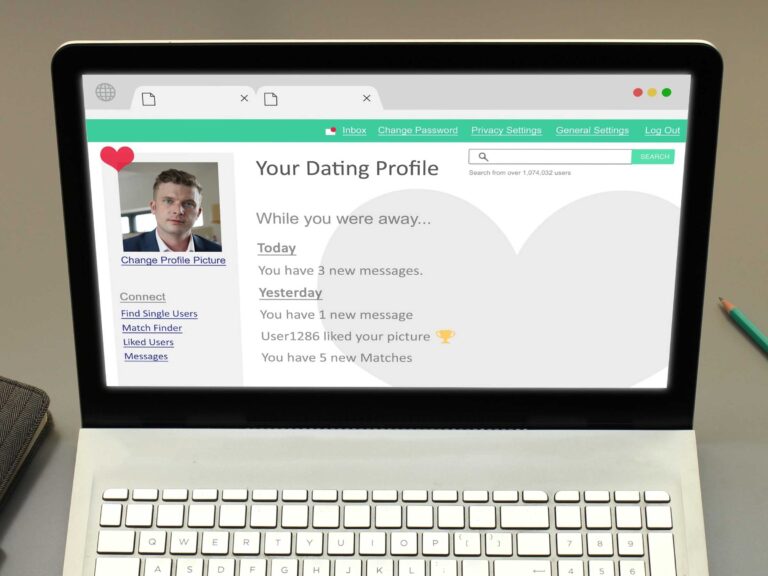
Once your profile is created, you’ll see what’s called a “dashboard” or home screen. Think of it like your car’s dashboard—it shows you everything you need to know at a glance. Don’t be overwhelmed by all the options; you’ll only use a few regularly.
The main areas you’ll see are Messages (your conversations with other members), Matches or Discover (people the site suggests for you), Search or Browse (where you can look for specific types of people), and Profile (where you can edit your information). Everything else—settings, help, logout—you can ignore for now.
Most of your time will be spent in just two areas: looking at suggested matches and checking messages.
The site does most of the work for you, suggesting people based on your preferences and their preferences. You just need to review these suggestions and decide if you’re interested.
When you see someone interesting, you have options for showing interest. The simplest is the “Like” or “Heart” button—clicking this tells them you’re interested without requiring you to write anything.
If they like you back, you’re matched and can message each other. It’s like making eye contact across a room and smiling—a signal of interest without commitment.
Navigating Common Technical Hurdles
Every beginner encounters technical hiccups that feel like disasters but are actually minor bumps.
When Dorothy couldn’t log back into her account after creating it, she assumed she’d been hacked or banned. The reality? She’d typed her email address with a capital letter when creating the account but with lowercase when trying to log in. The computer saw these as different.
The “forgot password” feature becomes your best friend. If you can’t log in, don’t panic or create a new account. Click “Forgot Password,” enter your email address, and check your email for reset instructions.
This process might take a few minutes—computers aren’t instant, despite what your grandchildren might have you believe.
Text size problems plague many mature users. If everything looks tiny, you’re not going blind—the text is genuinely small.
On a PC, hold down the Ctrl key and press the + key to make everything larger. On a Mac, hold Command and press +. Keep pressing until it’s comfortable to read. This works on any website, not just dating sites.
Making Contact: From Viewing to Communicating
The progression from viewing profiles to actual communication feels like crossing a bridge for many beginners.
You can look at profiles all day without anyone knowing—it’s like window shopping. But eventually, you need to express interest if you want to connect.
George spent three months just browsing profiles without contacting anyone. “I was practicing,” he explains. “Learning how the site worked, what kinds of people were on there, getting comfortable with the idea.” This approach is perfectly fine.
There’s no rush, no deadline, no requirement to message anyone until you’re ready.
When you are ready, start with the simplest expression of interest: the Like button. It requires no writing, no cleverness, just a click. If they like you back, you can decide whether to message.
If they don’t, you’ve lost nothing but a click. This low-risk approach builds confidence for eventual messaging.
Your first message doesn’t need to be Shakespeare. In fact, it shouldn’t be. “Hi, I noticed we both enjoy gardening. What are you growing this season?” is perfectly adequate. Here a a list of simple message templates that get responses.
You’re starting a conversation, not writing a novel. The key is mentioning something specific from their profile so they know you actually read it, then asking a simple question that’s easy to answer.
Understanding the Financial Side
Most dating sites require payment for meaningful features, particularly messaging. This frustrates many beginners who expect everything online to be free.
But consider the value: for roughly the cost of one dinner out per month, you get access to thousands of potential partners, a secure messaging system, and various features to help you connect.
The free vs. paid distinction is important to understand. With free membership, you can usually create a profile, upload photos, browse other profiles, and receive matches.
But you can’t message people, see who viewed you, or use advanced search features. It’s like being able to walk through a library but not check out books—you can look but not truly engage.
When you’re ready to pay, choose the shortest subscription initially—usually one month—to ensure you like the platform.
Most sites heavily push longer subscriptions with better monthly rates, but there’s no point saving money on six months of a service you might not use. Once you’re comfortable and seeing value, you can upgrade to longer, cheaper subscriptions.
Payment online requires a credit or debit card. The process is secure if you see “https” in the web address and a padlock symbol near it. Enter your card information carefully, double-checking numbers.
The charge will appear on your statement as the company name, not “DATING SITE” in embarrassing capitals—billing is discreet.
Be aware that subscriptions typically auto-renew. When you subscribe for three months, it will automatically charge you for another three months when that period ends unless you cancel. Set a reminder in your calendar a week before renewal to decide whether to continue.
When You’re Stuck: Getting Help
Everyone needs help sometimes, and there’s no shame in asking. Dating sites want you to succeed—your success story is their marketing—so they provide multiple support options.
Most sites have extensive FAQ (Frequently Asked Questions) sections that address common issues. These are worth checking first because they often have screenshot tutorials showing exactly what to click. The search function within FAQs helps you find specific answers quickly.
If FAQs don’t help, customer service is available through email, chat, or phone. For beginners, phone support is often easiest.
Yes, you might wait on hold, but speaking to a human who can walk you through the process step-by-step is worth the wait. Keep your account information handy—they’ll need to verify your identity.
Don’t underestimate the value of asking for help from friends or family. Your neighbor who’s successfully online dating can show you tricks that would take hours to figure out alone.
Your tech-savvy grandchild can help with photo uploads. Your librarian might offer basic computer classes that cover online dating. Swallow your pride and ask—everyone needs help learning new skills.
? The Library Secret
Most public libraries offer free computer classes for seniors, and many specifically cover online dating basics. Librarians are also excellent resources for one-on-one help. They’ve seen it all, won’t judge, and genuinely want to help you succeed. Many libraries also have scanners for digitizing printed photos and private computer stations for creating profiles.
Building Confidence Through Small Victories
The path from complete beginner to confident online dater isn’t a leap but a series of small steps.
Celebrate each victory: successfully logging in, uploading your first photo, sending your first “like,” receiving your first message. These aren’t trivial accomplishments—they’re evidence of your capability and courage.
Barbara, now 71 and engaged to someone she met online, remembers her early struggles: “I accidentally sent the same message to someone three times because I couldn’t tell if it had sent.
I uploaded a photo sideways and couldn’t figure out how to rotate it. I once spent an hour trying to change my password. But each mistake taught me something, and within a month, I was navigating the site like I’d been doing it for years.”
The key is persistence paired with self-compassion. You’re not just learning technology; you’re revolutionizing how you meet people after potentially decades of doing it differently.
That’s huge. Every person whose profile you view once sat where you’re sitting, feeling overwhelmed and uncertain. They figured it out. So will you.
Your Week-by-Week Success Plan
Week 1: Exploration
Just look around. Create your basic account but don’t pressure yourself to complete everything. Browse profiles to get a feel for how others present themselves. Click different buttons to see what they do—you can’t break anything. Get comfortable with the layout.
Week 2: Profile Building
Complete your profile bit by bit. One day, add photos. The next, write your description. Then set your preferences. There’s no deadline. Take breaks when frustrated. Ask for help when stuck.
Week 3: Passive Engagement
Start “liking” profiles that interest you without messaging yet. See who the site suggests as matches. Read messages if you receive any, but don’t feel pressured to respond immediately. You’re still learning.
Week 4: Active Participation
Send your first message—just one. It doesn’t matter if they respond. The victory is in sending it. Respond to messages you’ve received if any interest you. Consider upgrading to paid membership if you’re seeing value.
Month 2 and Beyond:
Gradually increase activity as comfort grows. Message a few people weekly. Refine your profile based on what seems to work. Consider trying video chat features. Maybe even plan that first coffee date.
Ready to Take the First Step?
Join the easiest, most supportive dating sites designed for beginners
Start Your JourneyThe Permission to Be Imperfect
Here’s what nobody tells you about online dating technology: everyone’s faking competence to some degree. That 65-year-old with the perfect profile? She had her daughter help.
The gentleman sending witty messages? He drafts them in Word first and spell-checks twice. The woman with beautiful photos? Her grandson took them and edited them on his phone.
You don’t need to be perfect. Your profile doesn’t need to rival Shakespeare. Your photos don’t need to be professional quality. Your messages don’t need to be clever. You just need to be genuine, persistent, and open to learning.
The technology that seems insurmountable today will be routine within weeks. The profile that feels impossible to write will evolve naturally as you gain experience. The messages that terrify you to send will become as casual as saying hello to a neighbor.
Your Digital Dating Future
Six months from now, you might be video chatting with someone special, sharing online articles that made you think of them, or planning to meet after weeks of wonderful messages.
A year from now, you could be showing other beginners how to create profiles, having become the experienced one who helps others overcome their fears.
The technology is just a tool—a remarkably effective tool for connecting hearts that might never otherwise meet. Every technical challenge you overcome brings you closer to someone who’s also overcoming their own challenges to find you.
Every profile you view, every message you send, every small victory over the technology is a step toward connection.
Margaret, who began this article afraid to upload a photo, now sends messages while having morning coffee, video chats with matches on her iPad, and recently helped her neighbor create her first profile.
“The funny thing is,” Margaret reflects, “once I stopped being afraid of the technology, I realized it wasn’t about the technology at all. It was about being brave enough to believe I deserved love and clever enough to use modern tools to find it.”
Your person is out there, possibly struggling with the same “Upload Photo” button that’s frustrating you. They’re worth pushing through the technological challenges.
You’re worth their pushing through too. The computer is just the messenger. The message—that you’re ready for love and brave enough to seek it—that’s all you.
So take a deep breath. Open that browser. Type that web address. Click that “Join Free” button. Your adventure in online dating begins not with perfection but with that first, courageous click.
The love of your life might be just a few clicks away, waiting for someone exactly like you—someone who overcame their fear of technology because their desire for connection was stronger.
You’ve got this. One click at a time.